
You can reactivate a canceled Boosteroid subscription directly in your browser if your subscription was purchased through Adyen and meets the eligibility requirements.
Please note that this feature is available only for subscriptions processed by Adyen. Subscriptions purchased through other payment providers cannot be reactivated using this option.
Eligibility Requirements
To reactivate your subscription, all of the following conditions must be met:
At least 24 hours must have passed since the subscription was canceled.
More than 24 hours must remain until the subscription expiration date.
The subscription status must be CANCELLED, with a valid cancellation date.
The subscription must support recurring billing.
You must not have another subscription with an ACTIVE or RETRYING status.
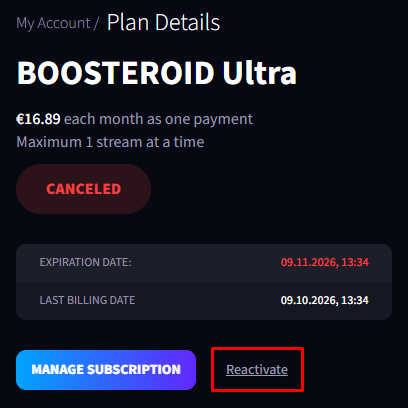
If your subscription meets these requirements, the Reactivate option will be available on the Plan Details page.
How to Reactivate Your Subscription
Log in to your Boosteroid account using a browser.
Open My Account and navigate to Plan Details.
Locate your canceled subscription and click Reactivate.
You will be redirected to a page where you can enter your payment card details.
Follow the on-screen instructions to complete the process.
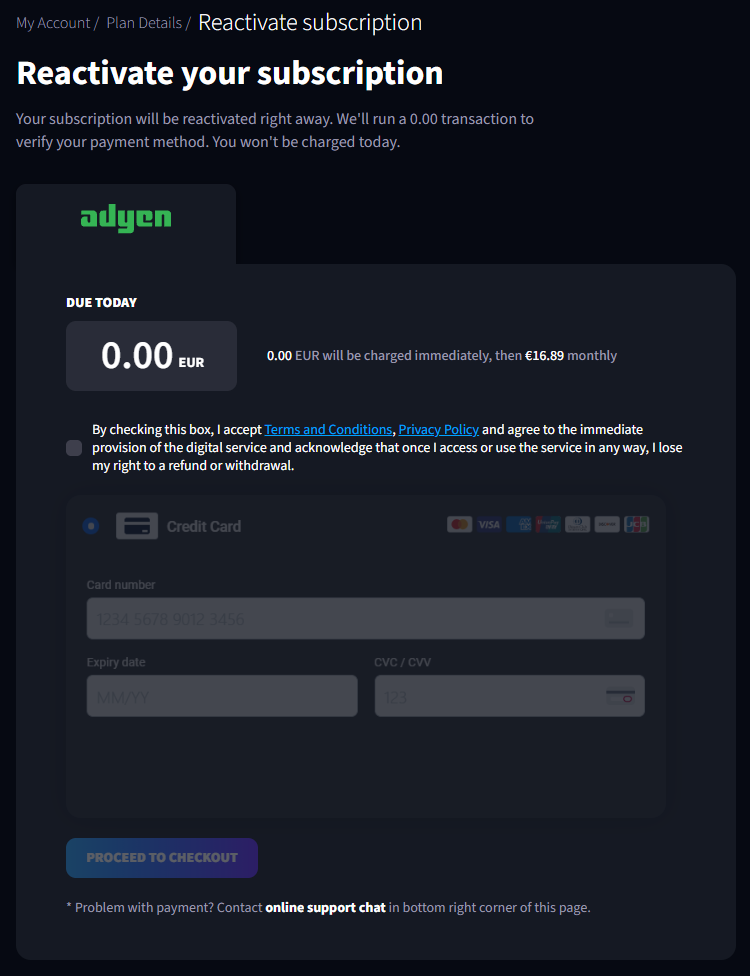
Once the process is completed successfully, your subscription will be reactivated according to the applicable subscription terms.
If the Reactivate option is unavailable, please check whether your subscription meets all the eligibility requirements listed above.